
These release notes describe the changes made to Bp VIP.net since Topaz SP4 build 2.1.539.015.
|
Release Date |
31 July 2026 |
|
Notes last updated |
20 July 2026 |
|
What is in this release? |
Bp VIP.net 2.1.540.010 contains bug fixes, new features and enhancements. |
|
What version can I upgrade from? |
You should be able to upgrade to 2.1.540.010 from any version of Bp VIP.net. Users updating from Topaz Revision 2 (2.1.526.057) or lower will need to update the .NET Framework to version 4.8 before updating Bp VIP.net. |
System Requirements
Webview2 installation
- The Webview2 install required for Bp VIP.net is included in the Bp VIP.net installer from version Topaz SP1 Revision 3 onwards, and will run silently in the background when users perform Bp VIP.net updates. Best Practice Software recommends installing Webview2 manually for users updating Bp VIP.net on terminal servers. See Download and Install Webview2 for further instructions.
Microsoft .Net Framework version 4.8
- Check the version of Microsoft .NET Framework on the Bp VIP.net server and workstations. Bp VIP.net version Topaz SP1 Revision 2.1 or higher requires a minimum .NET Framework version of 4.8.
- If you did not upgrade to the most recent version Topaz SP4 (2.1.539.015), review the release notes to see the changes in that version.
- Before running the Bp VIP.net installer, Best Practice Software recommends to stop VIPServices.net from Windows Services and restart the services again after the update is complete. See Configure and Start VIP Services for further instruction.
- Best Practice Software recommend that the upgrade be performed outside of normal business hours.
- Go to Help > What's New.
- Right-click the upgrade zip file link and select Save Link As or Save Target As under the heading for Bp VIP.net Topaz SP4 Rev 1 (2.1.540.010).
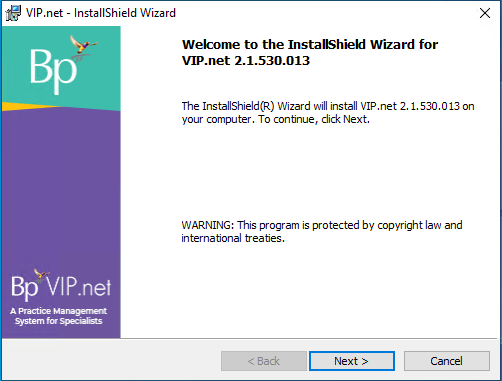
- Double-click the file to begin the installation. The Bp VIP.net InstallShield Wizard will open at the Welcome panel.
- Click Next to begin.
TIP You can also download the upgrade zip file from the Bp VIP.net Downloads page. If you are a beta user the installation file will be provided to you by Best Practice Software directly.
See Install Bp VIP.net for full instructions.
- Log in to the Bp VIP.net server computer as a Windows administrator. You may require Windows administrator permissions to install and update some Bp VIP.net components.
- If your practice uses a MIMS database, check your version of MIMS and update to the latest version if available.
- After completing the upgrade, Best Practice Software recommends restarting VIPServices.net. See Configure and Start VIP Services for further instruction.
- Check the new features, enhancements and bug fixes below for any required configuration.
Enhancements
|
Function |
Release Notes |
Key |
|---|---|---|
|
Day Stay |
Updates have been made to Bp VIP.net for Day Stay reporting in Victoria (VIC) in compliance with the revisions to the Victorian Admitted Episodes Dataset (VAED) for 2026-27 including:
|
83215 |
|
Day Stay |
Updates have been made to Bp VIP.net in Western Australia (WA) in compliance with the updates in WA Health Establishment list for 2025-26. |
83515 |
|
Credit On Hold |
The COH Authorisation prompt has been updated with new wording: “All/Some of the COH cannot be used for this provider. To change this setting, please navigate to Setup > Providers > This Clinic > Internal Tab (Allow credits to be used by other Providers).". |
81571 |
|
|
A new button has been added to the Email: New Email Message screen to Attach Medical Images. More than one image can be selected at a time to attach to the email. |
77866 |
|
MyComms |
The ability to forward correspondence in MyComms to an RSD address has been added to Bp VIP.net. All forwarded letters are transmitted as Correspondence. |
78135 |
|
MyComms |
Bp VIP.net has been updated to allow Letters and Referrals linked to a Task to be deleted. The Task will also be deleted with the Letter or Referral. |
80912 |
|
User Defined Forms |
A new UDF preset field has been added to Bp VIP.net under Medical > Created By workstation, to populate the logged in user’s workstation name. |
77593 |
Bug fixes
|
Function |
Release Notes |
Key |
|---|---|---|
|
Day Stay |
An error has been resolved with Day Stay reporting for Tasmanian (TAS) sites where the diagnoses code was not correctly transmitted with the reporting data. |
83119 |
|
Day Stay |
When transmitting Day Stay batches some users experienced an ‘Unhandled exception’ error. This error has been resolved. |
83259 |
|
Export Letter Data |
When using the Export Letter Data utility, the number of letters reported as successfully exported did not match the number of letters exported in the utility. This issue has been resolved. |
79147 |
|
Operations |
When an Operation booking was deleted from the Appointment Book and the user selected No to the prompt asking if the operation should be moved to the operations waiting list, the operation would not be deleted and was left as an Unplanned Operation. This error has been resolved. |
81612 |
|
Prescribing |
When creating a prescription with Staged Supply selected, if the inactive period lockout timer expired from the Preview Medications window with the eScript token warning prompt for the Staged Supply medication still on screen, an error would occur after logging in again to send the prescription. This error has been resolved. |
83121 |
|
User Defined Forms |
An error has been resolved with UDF fields with optical data values not displaying with plus (+) or minus (-) signs in the Summary notes. |
75766 |



 AU
AU  support@bpsoftware.net